APM: How It’s Built and How It Stacks Up to Traditional CPM

The core capabilities you buy in an enterprise CPM platform can now be built in the Microsoft stack: Fabric, Power Platform, and M365. Add an agentic layer on top, and for many organizations that stack can replace not only CPM software but also legacy analytics, visualization, and ETL tools.
This is a strong claim, but one that we have proven at scale over the last two years. In this article we’ll walk through how we architect APM solutions and compare each area to specialized CPM providers. There are tradeoffs to consider on both sides.
To be clear upfront: we are not advising you to vibe code a planning software from scratch. APM combines old and new, deterministic and probabilistic, proven and pioneering. The products listed herein are well-established with millions of users from SMB to F100 scale.
We are also not selling yet another CPM software product. What we bring to the table is an approach for integrating these Microsoft platforms in a strategic way based on many years working with the best CPM tools. And then establishing a powerful agentic layer directly on top.
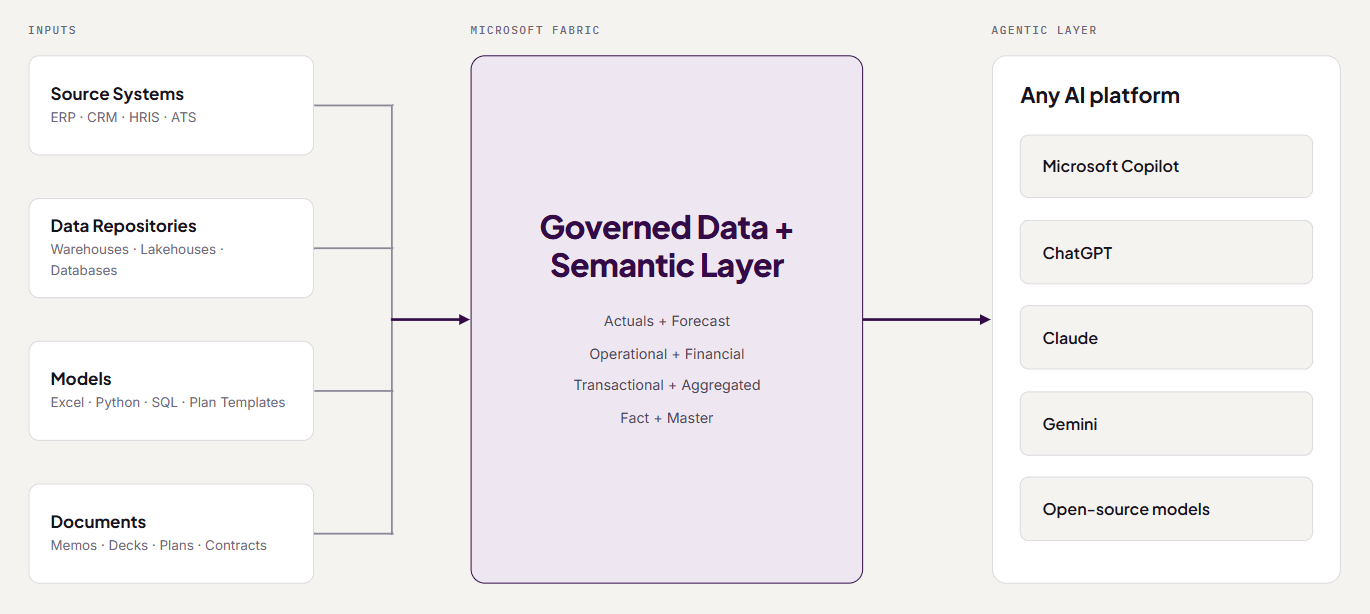
The CPM foundation is in fact just a means to an end, which is the full realization of the agentic layer in the AI platform of your choice, whether it’s Copilot, Claude, ChatGPT, Gemini, or open source. Your agents reliably operating on all of your context and data without third-party restrictions.
1. Data Integrations
How CPM does it. CPM tools pull data in through flat files, native connectors, or third-party integration tools. Transformation logic often resides in middleware that the Finance team does not own. Sending data back out to source systems is possible but usually takes custom API work. Every layer adds latency and costs.
How APM does it. Fabric is first and foremost a data management platform. It runs on OneLake storage and has Azure Data Factory’s ETL capabilities built in, with 200+ out-of-the-box connectors and custom integrations as needed.
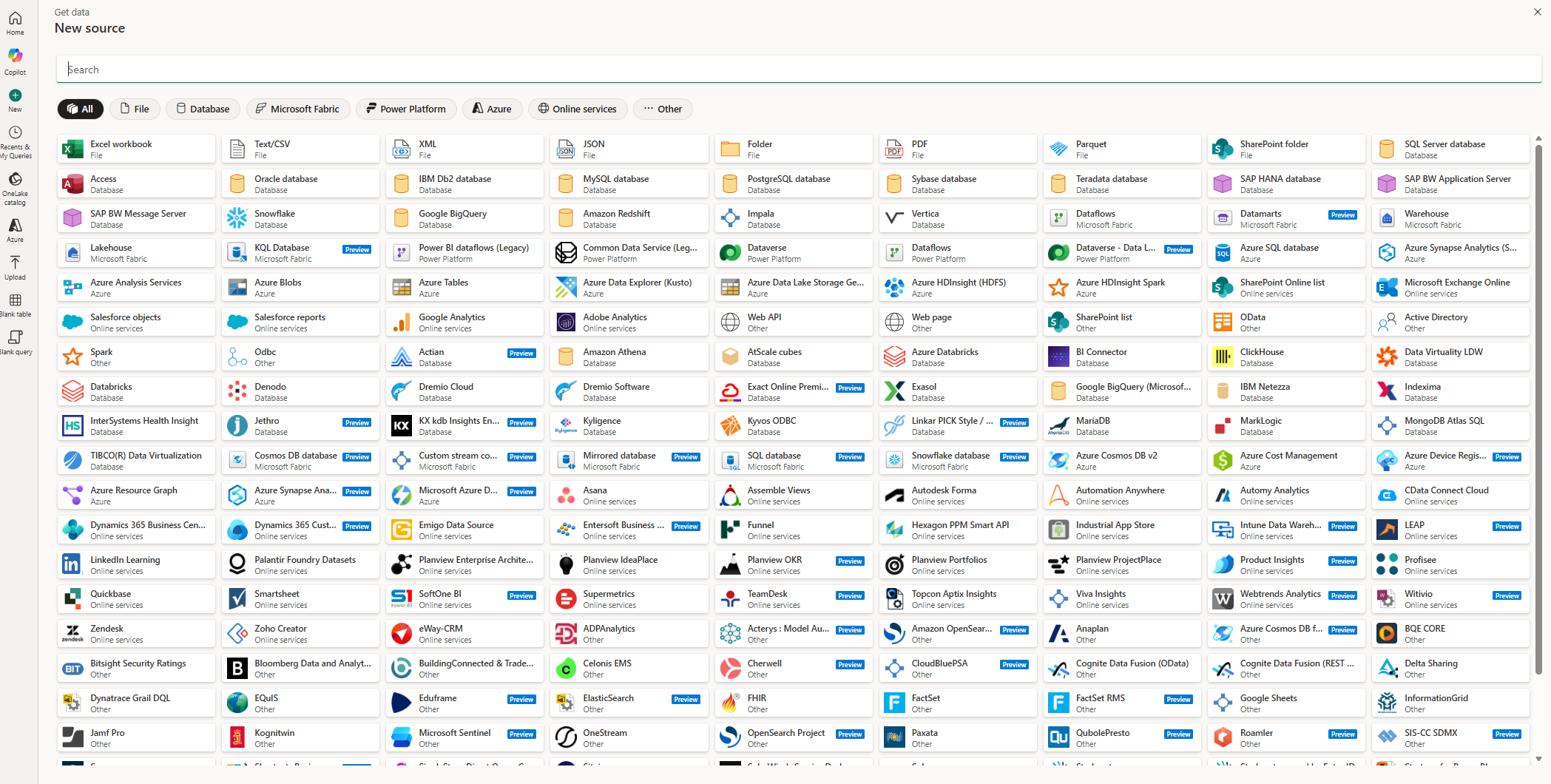
Data sits in a warehouse you own, where it can be transformed, joined with any other source, and queried by either humans or agents. We organize data in a medallion architecture: raw data lands in bronze, gets cleaned and conformed in silver, and is shaped for planning and reporting in gold.
Where APM wins. One platform handles ingestion, transformation, and output, so there are no separate BI or ETL siloes and no handoff between teams. Bidirectional flows are simple. Pushing approved requisitions back into the ATS automatically is routine in Fabric. FP&A moves closer to the data, eliminating the typical BI/FP&A gap where data is split between actuals and forecast, operational and financial.
2. Semantic Layer
How CPM does it. Hierarchies, mappings, and metric definitions live inside the CPM model. BI keeps its own definitions in a separate platform. The result is often multiple versions of the truth depending on where you pull your data, and executives spend meetings debating whose number is right or waiting on entire systems to be synced.
How APM does it. Power BI semantic models sit inside Fabric, directly on top of the gold layer. They hold the measures, relationships, hierarchies, and formatting that turn GL transactions into “Non-GAAP Revenue” or “FY26 Sales Plan.” Actuals and forecasts share the same definitions in the same model. Fabric has the accessibility and scale to be an organization-wide governed data and semantic layer.
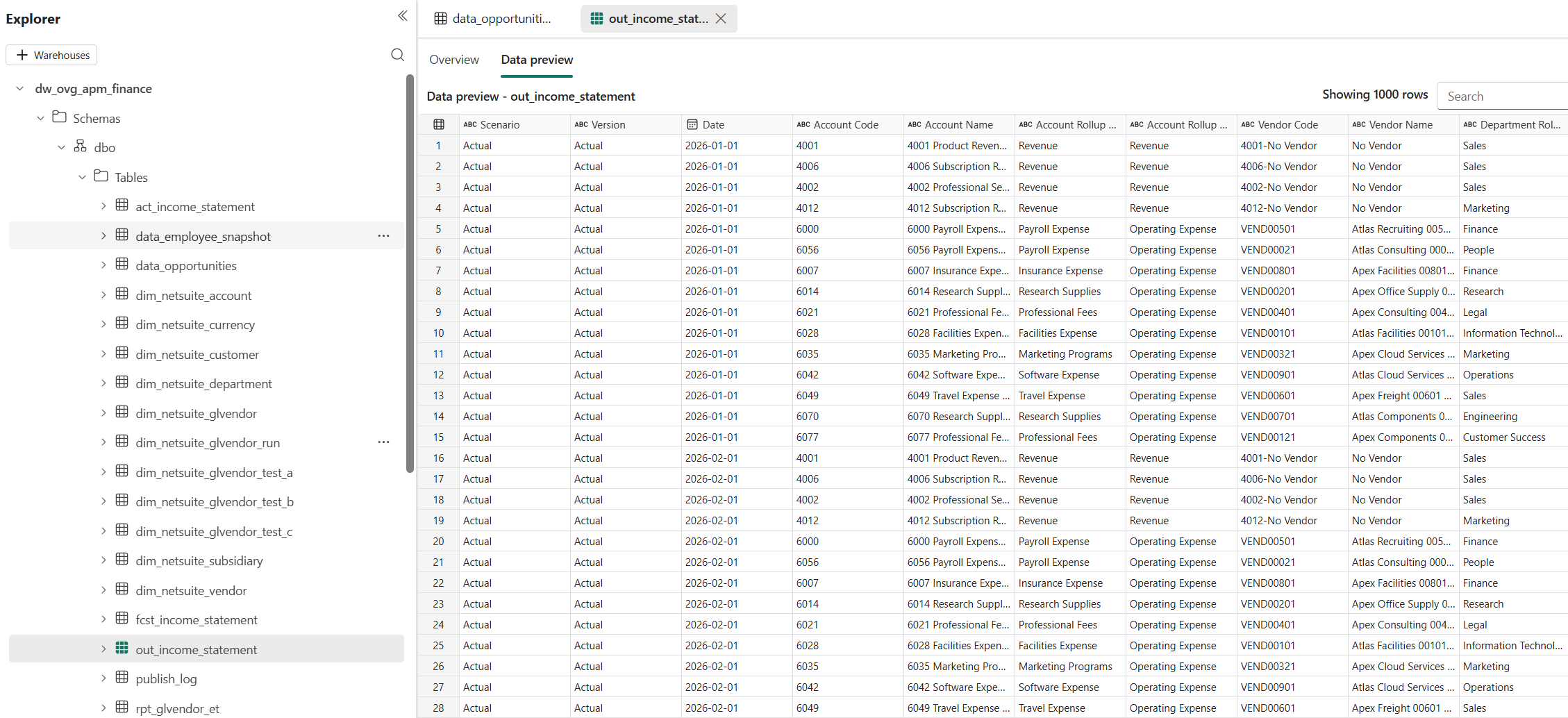
Where APM wins. One governed layer drives models, reports, analysis, and agents. When an executive asks an agent for bookings vs. plan, the agent queries the same definitions finance signs off on, not raw tables. This is the piece that finally unifies BI and CPM, because planning and reporting share one set of definitions instead of reconciling two.
3. Modeling
How CPM does it. Modeling is the heart of CPM tools. Leading tools run powerful multidimensional, in-memory calculation engines. Dimensions are defined as lists, time is built in, and logic is written in proprietary formula syntax. Change an input and every dependent calculation updates automatically. These engines are a differentiator for CPM tools.
How APM does it. There is no single engine. We place each use case where it fits best:
- Excel for driver-based models the business owns and changes often. Workbooks push to and pull from Fabric directly.
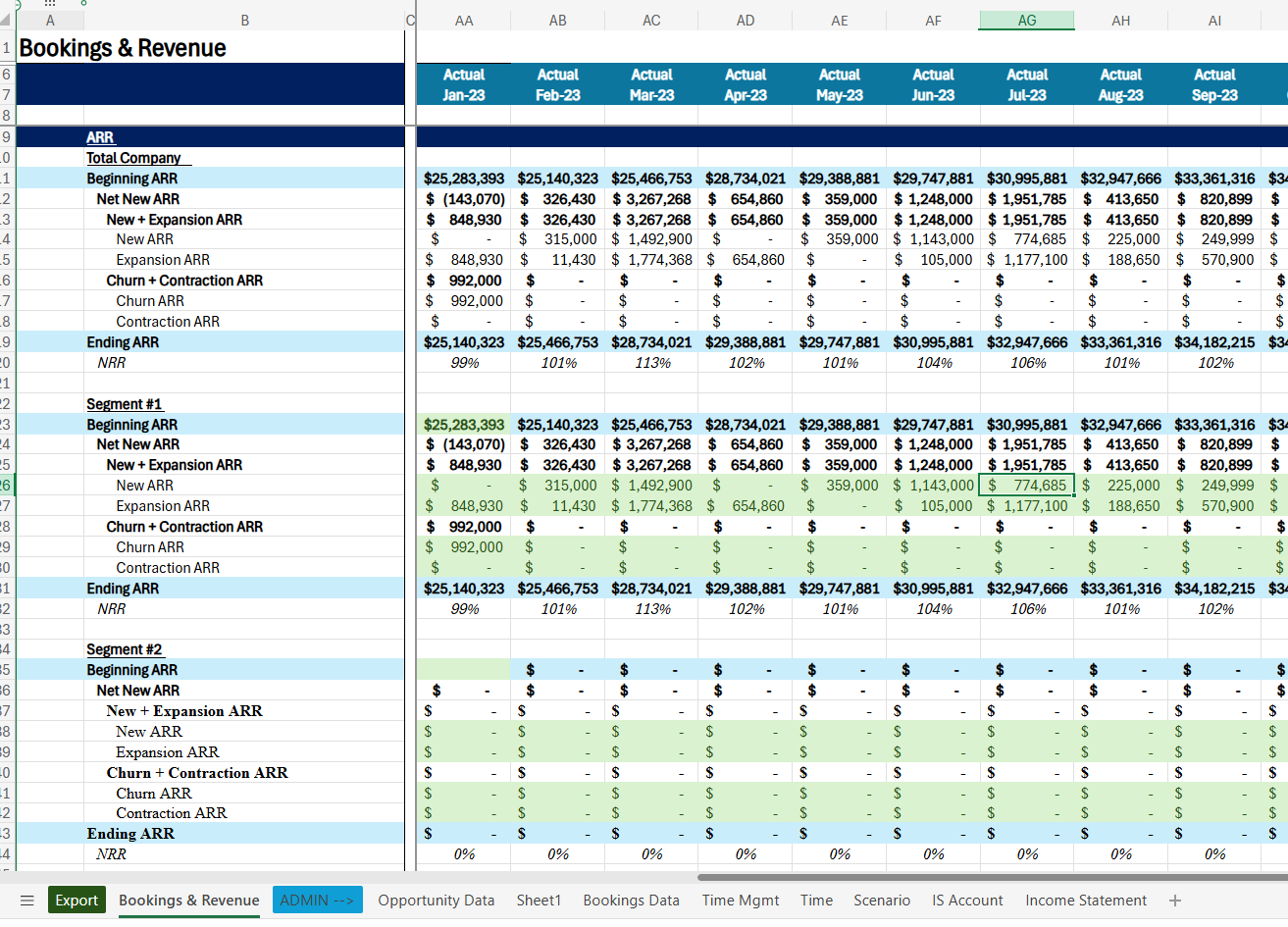
- SQL and Python in Fabric notebooks and the warehouse for high-volume, deterministic logic: allocations, headcount roll-forwards, revenue waterfalls, and statistical or ML forecasts.
- DAX in the semantic model for aggregations, time intelligence, and key metric calculations that are consistent across the organization.
- Plan in Fabric IQ, Microsoft’s new built-in application for web-based planning sheets with writeback on top of semantic models.
- Third-party applications like Aimplan are also an option embedded directly in Fabric.
- Agents can increasingly carry the modeling load, able to build models in any of the universal languages above: Excel, SQL, Python, or DAX.
Where APM wins. No proprietary syntax, which lowers technical barriers dramatically. Logic written in SQL, Python, and Excel can be read, reviewed, and changed by agents and by a much wider pool of people. Size limits are far higher than typical CPM model ceilings. Pricing is driven by capacity, not seats or model size. Excel can be used where flexibility is needed, and the business owns its models again. One client was able to plug in a new revenue model in days instead of waiting weeks for us to translate it into a CPM tool.
The tradeoff: recalculation speed. In a CPM tool, every dependent calculation within a model updates the moment an input changes. In APM, Excel models recalculate instantly on the desktop, but logic in SQL or notebooks updates when its pipeline runs. Models must be consolidated across the different modalities based on the client’s forecasting process. This adds some latency, but we’ve found that it is manageable. The tradeoff is a degree of latency on recalculations in exchange for a more streamlined overall process from raw data to agent.
4. Consolidation
How CPM does it. All inputs and logic live within the CPM tool. Forecasts may need to be aggregated across models or modules. Models will often recalculate in real time but need to be consolidated via processes for the full organization. Spreadsheets or models in other modalities need to be manually imported for processing.
How APM does it. Inputs can be ingested from many sources via an automated consolidation process: Excel workbooks, Power Apps, notebooks, Plan sheets. Fabric pipelines land them in the warehouse and roll them up, and reporting refreshes automatically.
We have established design paths that can manage and efficiently load hundreds of Excel workbooks at once, and multiple use cases can be synced through a single pipeline. Users trigger a sync on demand from Excel or an app rather than waiting on a schedule.
Where APM wins. Consolidation reaches across any source, not only data entered into one tool. Headcount from a Power App, budgets from department workbooks, and revenue from a notebook model can all meet in one place, on the same dimensions. Being able to scale Excel workbooks feels like having your cake and eating it too for many clients. And the optionality is great for clients whose needs change over time.
The tradeoff: instant updates. This is the clearest area where CPM tools still have the edge. Because consolidation runs through a pipeline, a change in one workbook reaches the rolled-up view after a short refresh cycle, not instantly. For monthly forecasts and annual budgets, that gap rarely matters. For live, multi-contributor sessions where people need to see the total move as they type, CPM tools can be faster. We narrow the gap with on-demand syncs, scoped refreshes that process only what changed, and semantic models that read directly from OneLake without a separate import step.
5. Scenario Management
How CPM does it. Versions are a dimension: Actual, Budget, Forecast, and named scenarios. A version switchover rolls closed months from forecast to actuals. In classic Anaplan, each added version multiplies the model’s cell count, so teams ration scenarios to protect performance. Newer hybrid OLAP engines handle this better, but scenario counts still factor into model design.
How APM does it. Scenario and version keys sit on the fact tables. Multiple scenarios run concurrently, each with its own forecast period and assumptions. Monthly rollover is driven by a control table that marks which periods are closed, so actuals replace forecast automatically. With Excel connectivity, you can swap in a new model when the business changes and run it alongside the old one. Completed scenarios are snapshotted and locked for future reference.
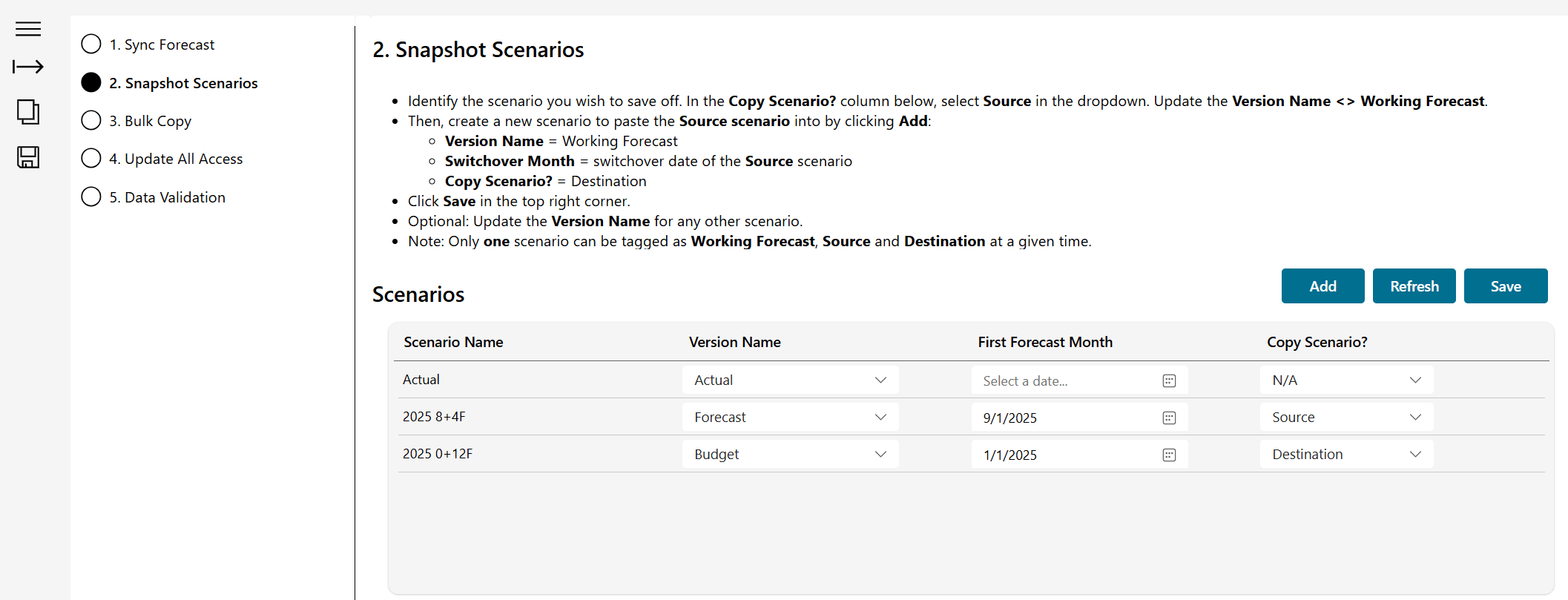
Where APM wins. Scenario count is bounded mainly by storage, which is cheap, so nobody has to delete last quarter’s downside case to make room. Scenarios can be compared in reports or by asking an agent which assumptions drove the difference. The same latency tradeoff from consolidation applies to live what-if analysis across many contributors. Treatment of scenarios can be adjusted by client. Everyone has different preferences when it comes to updating actuals or hierarchies retroactively, for example. APM can flex while out-of-the-box solutions often fall short.
6. Apps, Workflow, and Approvals
How CPM does it. Input forms, submission workflows, and task management are built into the tool. Every contributor needs a license and a login, which limits how far the process reaches into the business.
How APM does it. Apps are often the difference between getting meaningful input from stakeholders and getting nothing at all, so there are several options:
- Power Apps on web or mobile for structured input. Simple, proven, and easy to distribute. We run our own time tracking on one. Power Platform abstracts away all foundational app infrastructure.
- Power Automate for submissions, approvals, reminders, and locking periods once they are signed off. Approvals land in Teams and Outlook, where reviewers already are.
- Micro-apps or Artifacts spun up quickly with agent skills for specific needs with a few key users, like executive business partners.
- Fabric Apps, now in preview, for fully custom applications built in Replit and deployed into your own Fabric tenant with Entra authentication.
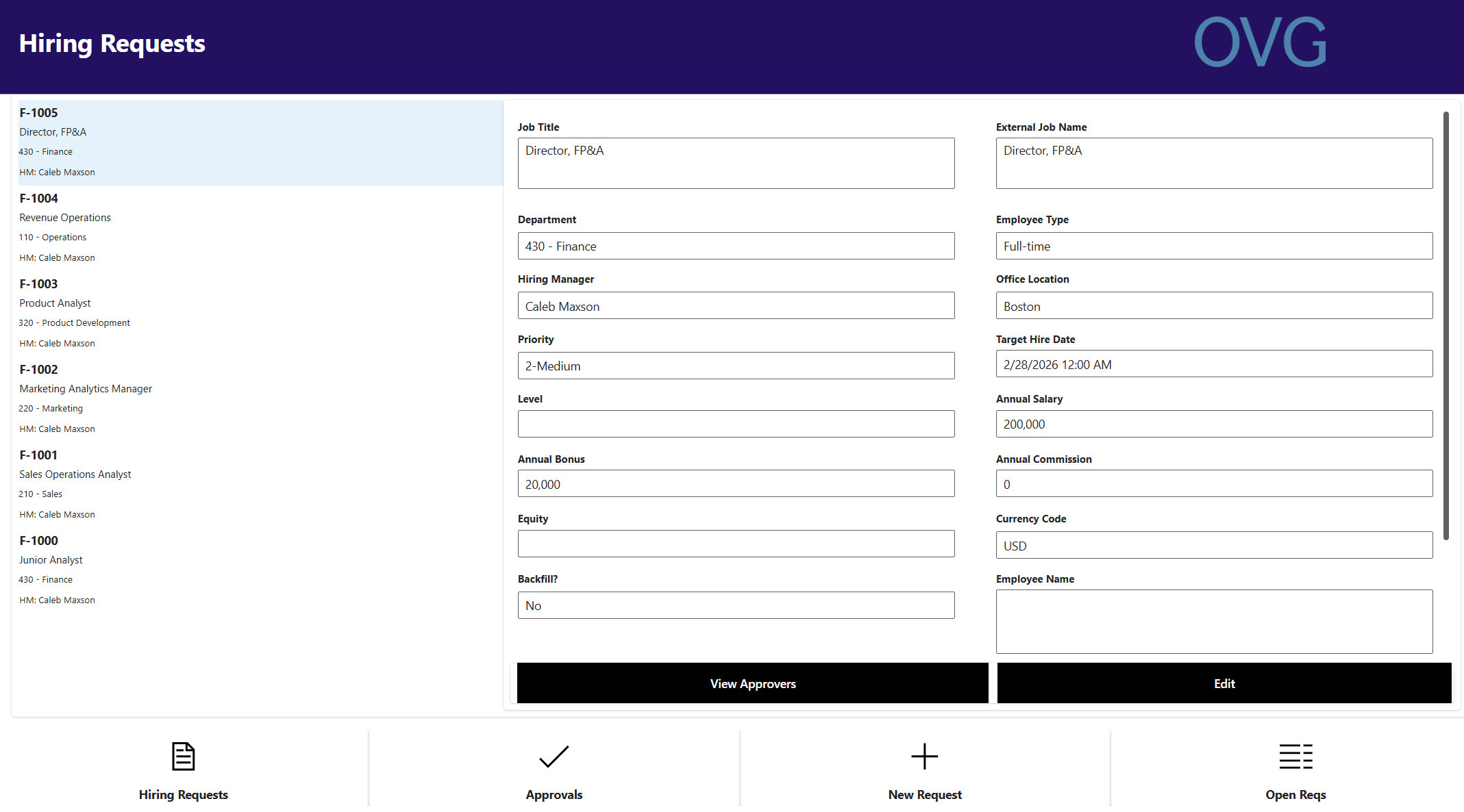
Where APM wins. Contributors work in tools they already have, so participation goes up and license costs go down. In a scaled deployment, 250 Power Platform app users run about $15,000 a year at Microsoft list pricing. Workflow can also reach outside finance: an approved req can trigger the ATS, the hiring manager, and the forecast in one flow.
7. Reporting
How CPM does it. Built-in dashboards and report boards. Executives rarely log in, so analysts export to Excel and PowerPoint to deliver the numbers. Most companies still run a separate BI tool for operational reporting. Newer tools offer MCPs for access to data via agents.
How APM does it. Power BI and its custom visuals cover standardized reporting. Data syncs live into Excel and the rest of M365, so decks and memos pull from the same source as the dashboards. Over time, more reporting moves into the agentic layer, because agents can build a visualization faster than a person can design a report.
Where APM wins. One reporting layer replaces both the traditional CPM dashboards and the separate BI tool, and the governed semantic layer provides the perfect foundation for agentic reporting and analysis, with no restrictions and full control over agentic design and context.
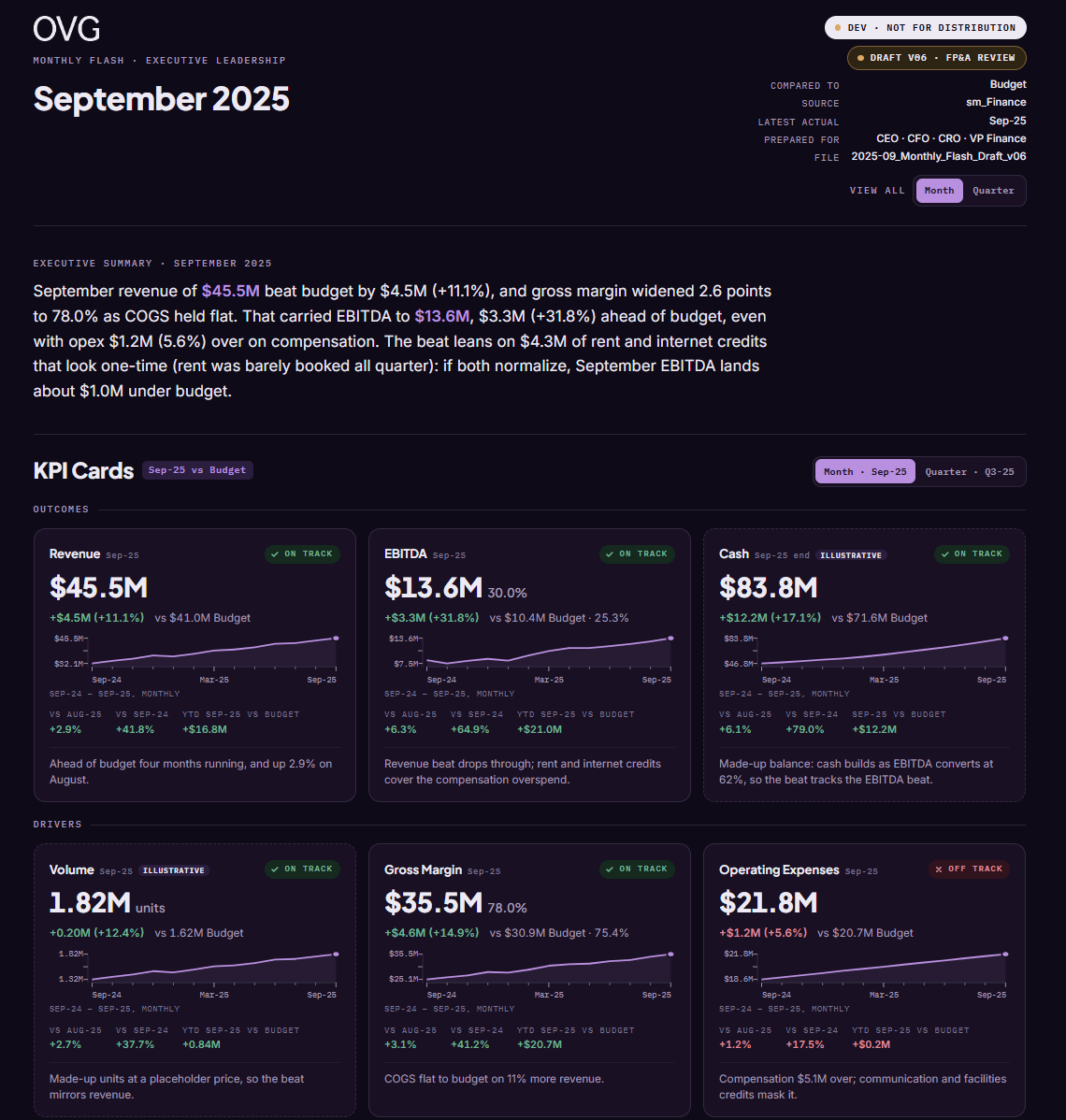
While CPM tools can release reporting agents and MCPs, building directly on Fabric and the AI platform offers more customization and flexibility than a third-party tool.
8. Security and Access
How CPM does it. A separate user directory, role model, and access configuration inside the tool, connected to the corporate identity provider through SSO. Every new user is another account to provision, and access rules live apart from the rest of the company’s security model.
How APM does it. Access runs through Entra ID, the identity system the company already uses. Permissions are managed by individual or security group, and can be as granular as needed, down to row-level and column-level security in the semantic model. Because everything sits in the Microsoft ecosystem, we can also automate access to files alongside the data in Fabric.
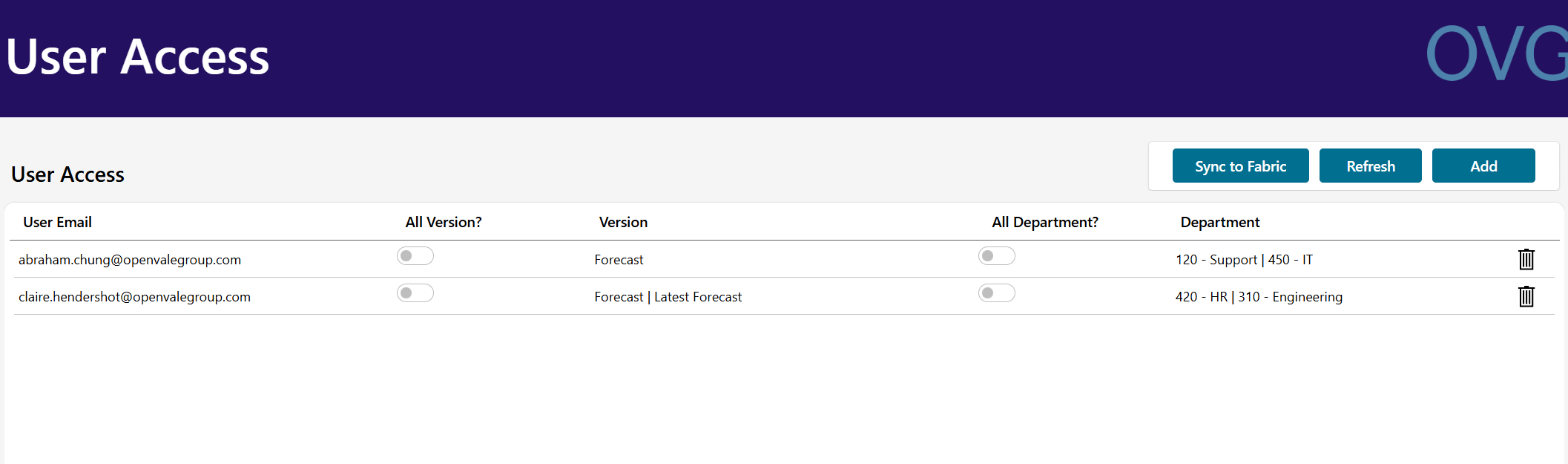
Where APM wins. No new logins. That matters for more than convenience: it is what makes a headless approach possible, where information reaches executives in the tools they already use. When agents run under the user’s identity, the same permissions pass through to the agentic layer, so an agent answering a regional VP’s question only sees that region’s data. Security can reach out to documents, meetings, chats, and emails, again reaching far outside the scope of a CPM tool.
9. Platform Operations
How CPM does it. The vendor runs the platform. Change management between development and production models happens inside the tool. Audit history is a real strength: Anaplan tracks changes down to individual cells. Model size limits cap how much granularity and data volume you can carry.
How APM does it. Fabric includes the tooling IT teams expect: Git integration with GitHub or Azure DevOps, deployment pipelines for CI/CD across development and production, monitoring, and backups. Every change to a notebook, pipeline, or semantic model is versioned and reviewable. Activity is logged and auditable, and the warehouse supports point-in-time queries and automatic backups. Capacity scales up or down as needed, and you can export an entire workspace as a single zip file for portability.
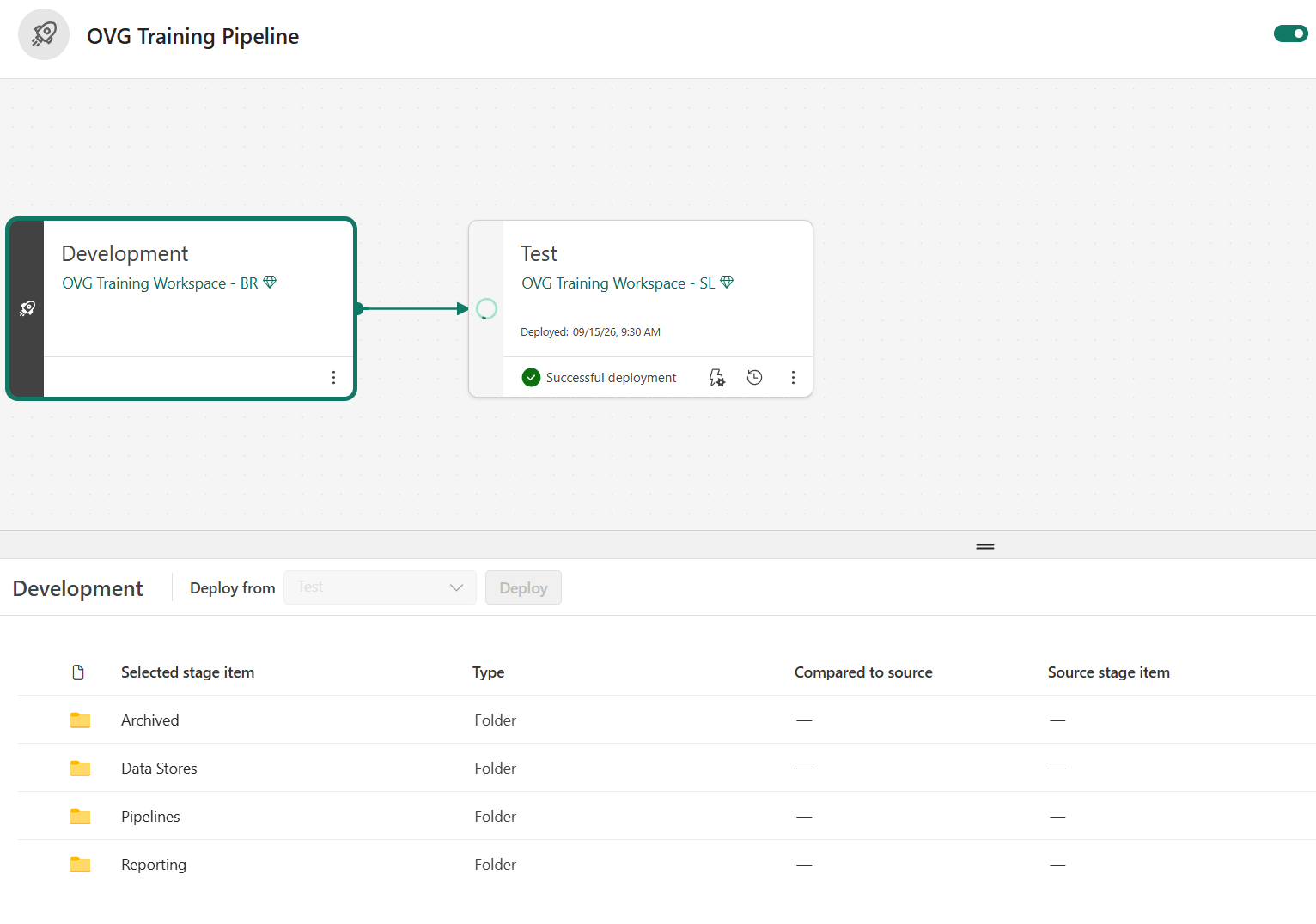
Where APM wins. IT can govern the platform with standards it already applies everywhere else, which is often what unlocks their support. Logic stored as code is diffable and auditable line by line. Scale becomes a capacity and cost decision. Granularity and data volume that would strain a CPM model are routine in a data platform.
10. Agentic Building
Everything above matters, but it is mostly table stakes against the best CPM tools on the market. This section is where APM pulls ahead.
How CPM does it. The leading vendors now ship real agents. Anaplan’s CoModeler builds and extends models through natural language. Pigment’s Modeler Agent does the same, and its MCP server lets Claude and other tools query and build in Pigment models. These are genuine advances, but each one builds inside a single proprietary engine, in the vendor’s syntax, on AI the vendor prices and controls.
How APM does it. Fabric provides open APIs for nearly everything except sensitive credentials. That means agents do more than report on data. They can:
- Serve: answer business questions against the governed semantic model and monitor solutions for issues.
- Build: design pipelines, write notebook logic, and stand up new models directly in Fabric.
- Operate: run recurring processes such as forecast tracking or board deck preparation on your behalf.
Where APM wins.
Four differences hold against every packaged tool:
- Full-stack building. Agents build across the whole stack: data, pipelines, semantic layer, planning models, and apps.
- Open languages. Agents work in SQL, Python, and Excel, which every major AI model is deeply trained on, instead of a vendor’s proprietary syntax.
- Your choice of AI. You pick the AI platform and pay for it directly, instead of renting AI at the vendor’s markup on the vendor’s roadmap.
- Ownership. What agents build is code and data you own and can take anywhere.
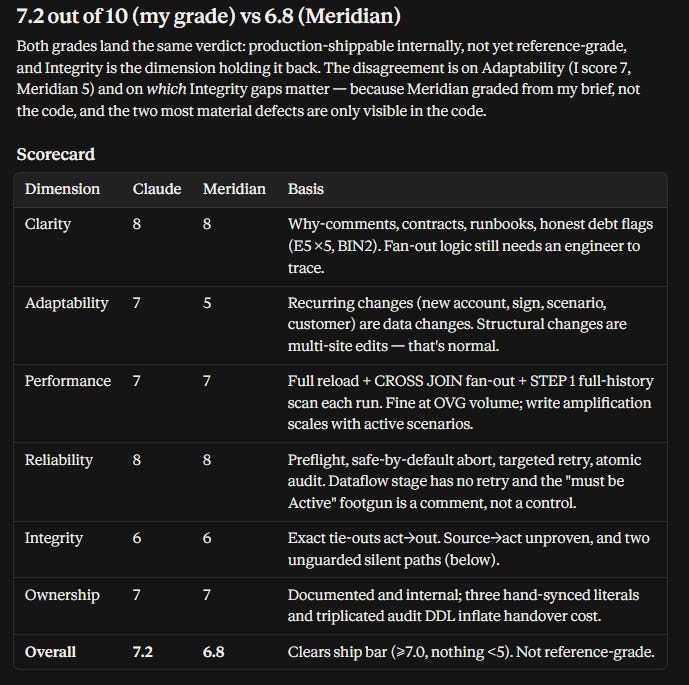
Leverage compounds from there. One client built their own reporting MCP server within their first year. Where you would normally hit a product ceiling with CPM software, with Fabric you hit another gear. At this point, your team starts producing with AI, not just consuming it.
Where CPM Still Wins
APM is a fit for many organizations, not all of them. Packaged CPM keeps a real edge in four areas:
- Real-time recalculation. When many contributors need to see totals move as they type, a single in-memory engine is faster than a refresh cycle.
- Out-of-box speed. Fabric was not built for CPM, and APM combines both BI and CPM, so the first build needs an architect. For a standard use case and a team that wants a packaged process, a CPM tool reaches a working plan with less design work.
- Technical lift. APM needs people comfortable with SQL and data concepts, and a working relationship with IT. Teams that buy SaaS specifically to avoid IT will struggle.
- Best-of-breed or straightforward needs. Packaged tools work well where an organization already runs a best-of-breed or decentralized technology approach, or where planning needs are straightforward. In those settings the integration and ownership benefits of APM matter less, and a packaged tool can be faster and cheaper to stand up.
If those tradeoffs are acceptable, the rest of this article applies. If they are not, a CPM tool may be the better choice.
Conclusion
Figuring out how to do all of this was not easy. That was our job. Now that the playbook exists, our goal is to put it into the hands of teams who want to own their performance management stack and build capabilities their competitors cannot buy off the shelf.
If you are evaluating options for your CPM and/or BI needs and are looking for a fresh approach (not to mention up to 90% cost savings), our APM approach is worth a look. With a 60-day trial and no long-term contract required, the risk of a pilot is minimal.
Now that we have covered all the core CPM bases, stay tuned for more on what we are working on with the agentic layer - MCPs, skills, context engines, and teams of agents are what take this foundation to the next level.